TL;DR
- Two-factor authentication protects an account whose password has already been stolen, which is the situation you should assume. Passwords leak constantly through phishing, breaches and reuse, and a second independent factor is what stands between a leaked password and a login.
- An SMS code is only as safe as your phone number, and your phone number is an account at a carrier, protected by procedures a stranger can talk their way through. US federal guidance treats SMS as a restricted authenticator for exactly this reason.
- The attacker gathers your personal details, convinces or pays a carrier employee to move your number to their SIM, then uses the number to reset passwords and receive codes, working from your email outward to your exchange. From the first bar of lost signal on your phone, the useful window is measured in minutes.
- An authenticator app removes the phone number from the equation; a hardware key or passkey removes the phishing risk too. Guard your highest-value accounts, the exchange and the email behind it, with the phishing-resistant options.
In one block
Two-factor authentication is an account security method that requires two independent proofs of identity before granting access: typically something you know, such as a password, plus something you have, such as a phone, an authenticator app or a hardware key. It protects an account even when the password leaks.
What does two-factor authentication actually protect?
Quick answer
Two-factor authentication protects an account whose password has already been stolen, which is the situation you should assume. Passwords leak constantly through phishing, breaches and reuse, and a second independent factor is what stands between a leaked password and a login.
Security factors come in three families: something you know (a password or PIN), something you have (a phone, an app that holds a secret, a hardware key), and something you are (a fingerprint or face). Two-factor authentication requires proofs from two different families. A password plus a security question is still one family, knowledge, and one phishing page captures both.
The reason this matters for crypto is asymmetry. For most online accounts, a takeover is recoverable: a bank reverses the transfer, a platform restores the profile. A crypto withdrawal is final. Once assets leave an exchange account for an attacker's address, no customer service queue can bring them back. Attackers know this, which is why crypto credentials are among the most targeted on the internet, and why the FBI's Internet Crime Complaint Center recorded 11.4 billion dollars in crypto-related reported losses in 2025 across 181,565 complaints.
One boundary is worth fixing early. Two-factor authentication protects accounts: logins guarded by a service that checks your factors. A self-custody wallet is guarded by keys, and a private key does not ask for a code. Both matter; they fail differently. This article is about the first kind.
Why is SMS the weakest second factor?
Quick answer
An SMS code is only as safe as your phone number, and your phone number is an account at a carrier, protected by procedures a stranger can talk their way through. US federal guidance treats SMS as a restricted authenticator for exactly this reason.
When a login code arrives by text, the code's security no longer depends on your phone. It depends on the carrier's process for deciding who owns the number. Anyone who convinces the carrier to move your number to their SIM receives your codes. That is a SIM swap, and it requires no malware on your device and no contact with you at all.
SMS has further weaknesses. Codes can be phished in real time: a fake login page asks for your password, then asks for "the code we just sent you", and the attacker relays both into the real site within seconds. Codes can also be intercepted through weaknesses in carrier signalling infrastructure, though for crypto theft the social-engineering route is far more common because it is cheaper.
The direction of official guidance is clear. NIST's digital identity guidelines, SP 800-63B, class SMS and voice codes as restricted authenticators, require agencies using them to acknowledge the risk, and point implementers toward phishing-resistant alternatives. The FCC has forced US carriers, since July 2024, to verify identity more strictly before SIM changes and number ports and to notify customers when a change is requested. Those rules raise the attacker's cost; they have not made the attack rare.
None of this means you should turn SMS codes off when nothing better is offered. SMS two-factor still defeats the laziest attacks, and an account with SMS codes is safer than the same account with a password alone. The rule is simpler: SMS is the floor, never the choice, and never the guard on your email or your exchange when an authenticator app, a hardware key or a passkey is available.
How does a SIM swap attack actually work?
Quick answer
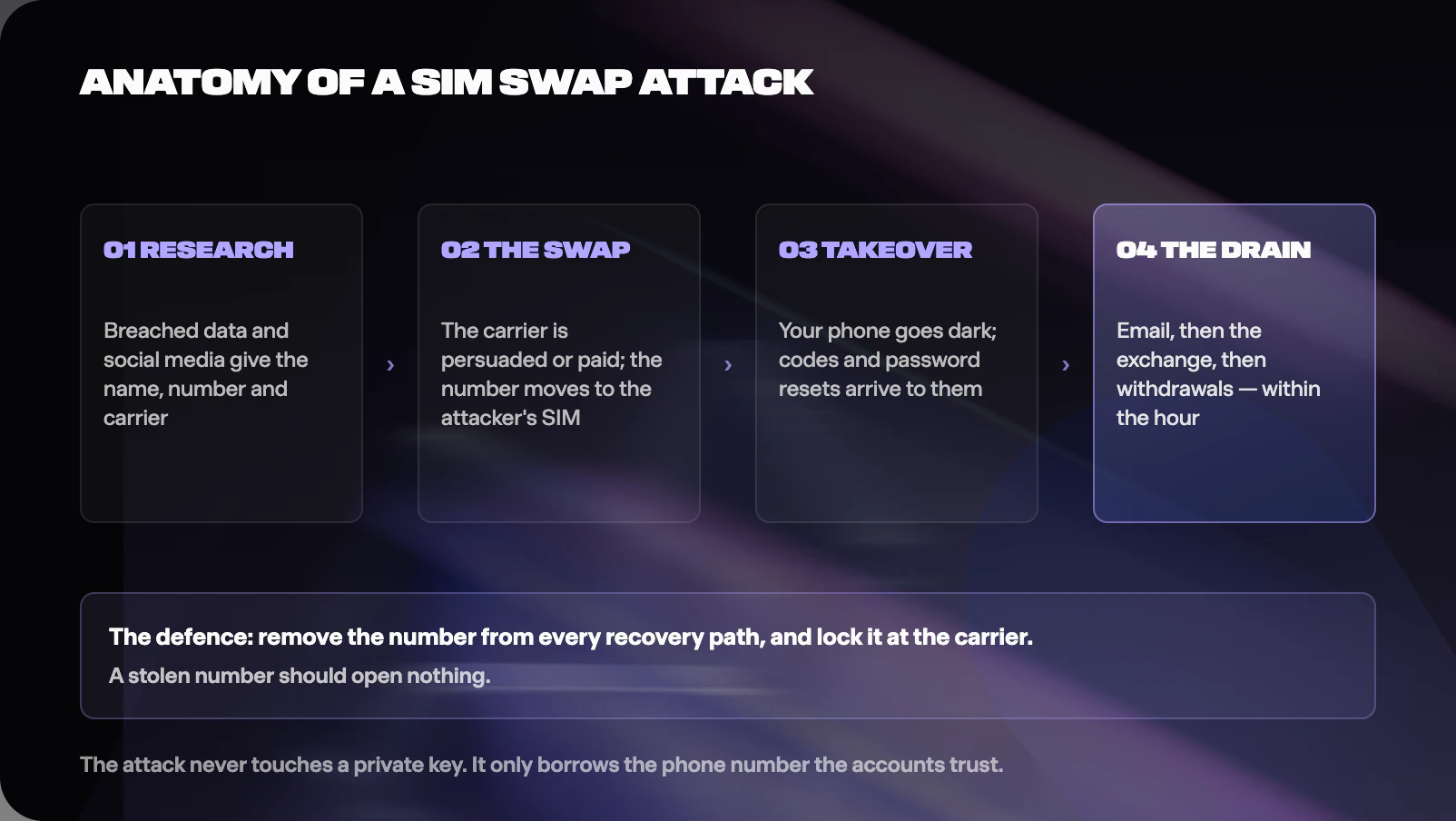
The attacker gathers your personal details, convinces or pays a carrier employee to move your number to their SIM, then uses the number to reset passwords and receive codes, working from your email outward to your exchange. From the first bar of lost signal on your phone, the useful window is measured in minutes.
The attack runs in stages, and knowing them tells you exactly where the defences go.
First, research. The attacker assembles your name, address, date of birth, number and carrier from data broker files, past breaches and social media. People who talk publicly about their crypto holdings get shortlisted; a Princeton study of carrier authentication found the details needed to pass a support call are routinely available or guessable.
Second, the swap itself. The attacker calls the carrier claiming a lost phone and asks to activate the number on a new SIM, answering security questions with the researched details. A variant, port-out fraud, moves the number to a different carrier entirely. A darker variant pays a retail or support employee to process the change directly; prosecutions in the US have repeatedly featured insiders paid per swap.
Third, the takeover. Your phone drops to no service. The attacker's device now receives your calls and texts. They trigger password resets on your email, which typically offers SMS recovery, then use the email plus SMS codes to enter the exchange, change credentials, and start withdrawals. Well-run groups have moved from first signal loss to first withdrawal within the hour, often at night in your time zone.
The 2025 IC3 figures, 971 complaints and 17.4 million dollars in reported losses across all crime categories rather than crypto alone, understate the problem, because reporting is voluntary and many victims report to no one. What the numbers do show is that a technique first noticed targeting crypto insiders in 2018 remains profitable and routine eight years later.
The defence follows the anatomy. Every stage assumes your phone number is a master key. Remove the number from that role and the chain has nothing to pull on.
What should you use instead: apps, hardware keys or passkeys?
Quick answer
An authenticator app removes the phone number from the equation; a hardware key or passkey removes the phishing risk too. Guard your highest-value accounts, the exchange and the email behind it, with the phishing-resistant options.
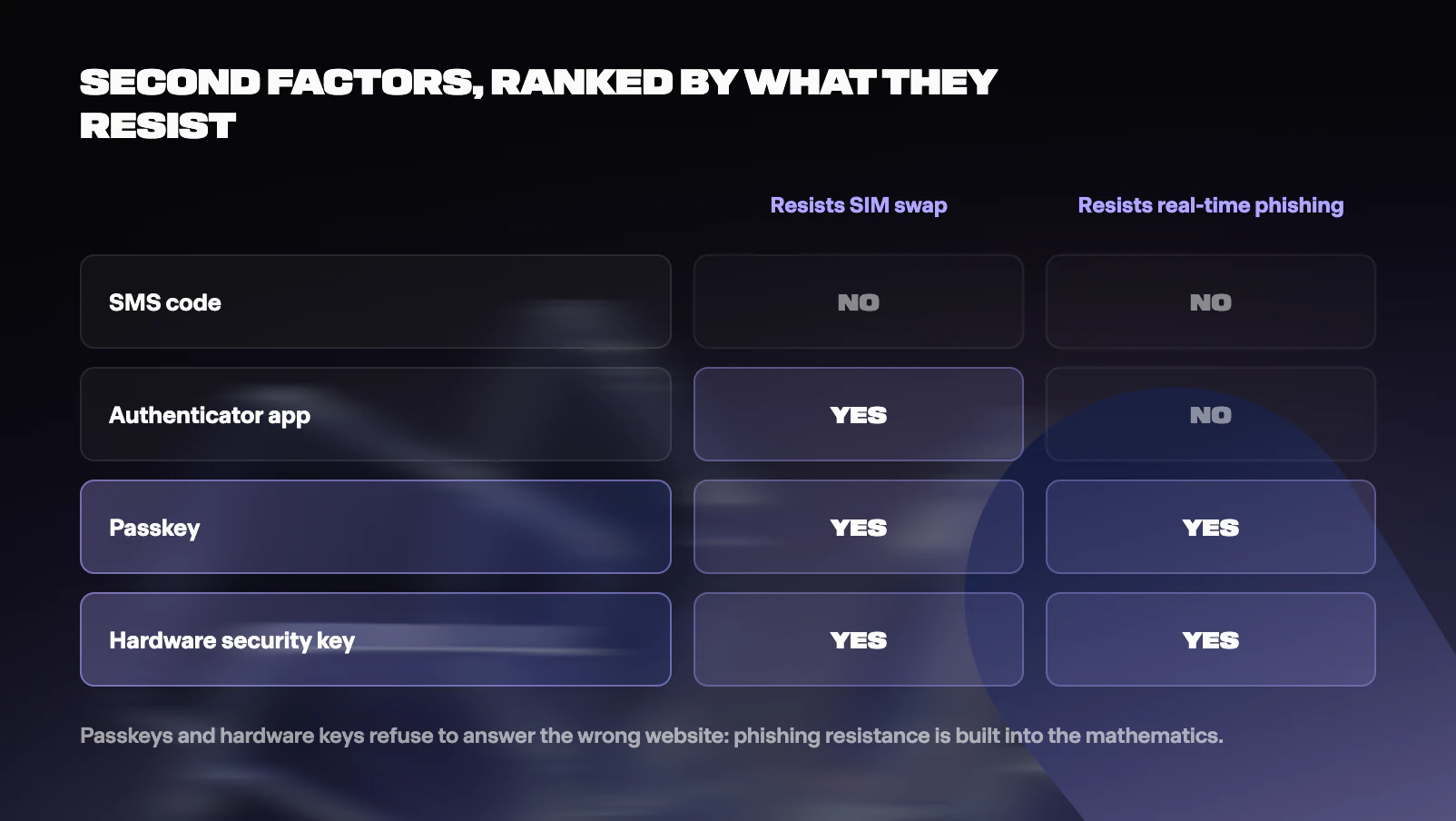
An authenticator app, such as a TOTP code generator, holds a secret on your device and derives a fresh six-digit code every thirty seconds. No text message is involved, so a SIM swap gains nothing. Two limits remain. A convincing fake site can still phish a live code by asking you to type it in, and app codes backed up to a cloud account inherit that cloud account's security, so a weakly protected backup can quietly reintroduce a single point of failure.
A hardware security key is a small device implementing the FIDO2 and WebAuthn standards. At login it signs a challenge that is bound to the real website's origin. A fake site, however perfect its design, presents the wrong origin, and the key simply will not produce a valid answer. This property, phishing resistance, is a structural protection you keep even on a bad day when you are tired, hurried, and certain the page in front of you is real. It covers the credential itself; account recovery flows, a compromised synced cloud account, malicious sessions on an infected device and endpoint compromise remain separate doors, which is why the rest of this guide exists.
A passkey brings the same standard into software: a key pair stored on your phone or laptop and unlocked with a fingerprint, face or PIN. Passkeys share the hardware key's phishing resistance, and their convenience is the point; the friction that once pushed people back to SMS is largely gone. If your passkeys synchronise through a cloud account, that account joins your security perimeter, so it needs the same care as your email.
The practical ranking for a crypto account is: hardware key or passkey first, authenticator app second, SMS only when nothing else exists, and email codes treated like SMS. One more rule saves people from a common self-inflicted lockout: register two hardware keys or keep a printed set of one-time recovery codes somewhere safe, so losing a device does not lock you out of your own defences.
How do you lock down a crypto account, step by step?
Quick answer
Work from the foundations upward: email first, then the exchange, then the phone number, then withdrawal controls. An attacker works through your accounts in exactly this order, so defend them in this order.
Step 1: secure the email behind everything. Your email account can reset nearly every other password you own, which makes it the true perimeter. Give it a long unique password from a password manager and the strongest second factor it supports, ideally a passkey or hardware key. Remove your phone number as a recovery method; recovery options are alternative doors, and an SMS recovery door reopens the SIM swap route you just closed.
Step 2: secure the exchange account. Unique password, phishing-resistant second factor, and a check of the account's recovery paths for the same phone-number trapdoor. If the platform offers an anti-phishing code, a phrase it includes in genuine emails, set one.
Step 3: lock the phone number itself. Ask your carrier for a port-out block and a SIM-change PIN; US carriers must offer stronger verification under the FCC's rules, and UK networks provide similar locks on request. Then demote the number: remove it from two-factor and recovery settings on any account that touches money, and treat it as a contact detail rather than an identity credential.
Step 4: turn on withdrawal controls. An address allowlist restricts withdrawals to addresses you approved in advance, usually with a time delay on changes. A withdrawal delay or daily limit turns a five-minute raid into a slow, noisy one. These controls specifically defeat the attacker's need for speed.
Step 5: reduce the attack surface around the account. Log in through a bookmark rather than search results or links in messages, because sponsored-result phishing is a standard lure. Keep devices updated. Say less in public about what you hold; every boast is targeting data, a theme the physical security article in this cluster takes much further.
Nothing in this list requires technical skill. It is an afternoon of settings, and it converts you from an easy target into an expensive one.
What should you do if a SIM swap hits you?
Quick answer
Treat sudden full signal loss on your phone as an active emergency, because the useful response window is the first hour. Call the carrier from another phone, then race the attacker for the email account, then freeze the exchange.
The tell is abrupt: your phone shows no service in a place it normally works, or a message announces a SIM activation you never requested. Sometimes the first sign is stranger, a flood of password reset emails, or friends reporting texts you never sent.
Act in this order. Call the carrier from any other phone, report an unauthorised swap, and have the number suspended or reclaimed; fraud teams can reverse a swap quickly once told. Next, from a device where you are still logged in, check your email account's settings, change the password, and remove any recovery methods or forwarding rules you did not create; attackers plant forwarding rules to keep reading your mail after you recover it. Then contact the exchange, freeze withdrawals, and review recent activity. Finally, change passwords on anything that used the number for recovery, working from financial accounts outward.
Report the incident even if you stopped it in time. In the US, file with the FBI's Internet Crime Complaint Center at ic3.gov; in England, Wales and Northern Ireland, use Report Fraud, which replaced Action Fraud in December 2025; in Scotland, call Police Scotland on 101. Reports build the case files that lead to arrests, and insider-assisted swaps have produced prosecutions on both sides of the Atlantic.
Two habits blunt the attack in advance: keeping your number out of your recovery settings, so a stolen number opens nothing, and keeping withdrawal delays on, so even a successful login cannot finish the job quickly.
Where does account security end and key security begin?
Quick answer
Everything in this article protects accounts, where a company checks your identity before acting; keys answer to no support desk, which is their strength and their risk. The two models fail differently, and a complete security posture covers both.
An exchange account is guarded by authentication: the platform holds the assets and decides, based on your factors, whether you are you. This cuts both ways. A support desk can freeze withdrawals mid-attack and restore your access afterwards; that same support desk is an attack surface a persuasive stranger can work on, as every SIM swap shows.
Self-custody removes the middleman. A wallet's private key signs transactions directly, no code is texted to anyone, and a SIM swap is irrelevant to it. The trade is that the recovery safety net disappears too: lose the key material, or leak it, and no fraud team exists to call. The classic single-key wallet concentrates everything into one secret, a seed phrase, whose loss or theft is total. This is why the custody side of security has its own engineering: multisignature setups and threshold cryptography split signing authority across several devices or people, so no single stolen secret, and no single coerced person, can move the funds. Those designs have their own article in this academy.
The honest summary is that "which is safer" is the wrong question. An exchange account with a hardware key, locked-down email and withdrawal delays is a hard target. A self-custody setup with distributed keys is a hard target. A weak version of either is the soft target attackers are searching for. Secure the accounts you have today; learn the custody model before you hold more than you can afford to have frozen, lost or stolen.
Frequently asked questions
Is SMS two-factor authentication better than nothing?
Yes, clearly. It stops opportunistic attacks that use only a leaked password. The problem is the specific attacker it invites: anyone able to take over your phone number takes your codes with it. Use SMS only where no authenticator app, hardware key or passkey is offered, and never as the guard on your email or exchange.
Can a SIM swap steal coins out of my self-custody wallet?
Not directly. A private key never travels by text message, so taking your number does not touch the wallet. The realistic route is indirect: the stolen number helps take your email and exchange accounts, and phishing that follows may then target your wallet with malicious signature requests, which is a different attack with its own article in this cluster.
Are passkeys really safe if they sync through my cloud account?
The passkey itself is phishing-resistant; origin binding prevents it from answering an impostor site. Synchronisation means your cloud account now stores login credentials, so it must be defended like your email: strong unique password, strongest available second factor, no SMS recovery. Protect that one account properly and synced passkeys are a large net gain over codes.
How do I know if my number has a port-out block?
Ask the carrier directly, because names differ: number lock, port freeze, SIM protection, transfer PIN. US carriers are required to offer heightened verification for SIM changes and ports; UK networks apply protections on request. Set the block, and record the PIN in your password manager rather than anywhere guessable.
What is the single highest-value change if I only do one thing today?
Put a phishing-resistant second factor, a passkey or hardware key, on the email account behind your exchange, and strip your phone number out of that account's recovery options. Email is the root of the account tree; secure the root first.
Sources and further reading
Key references for this article, current as of July 2026. Volatile figures are re-checked at each quarterly review.
- FBI Internet Crime Complaint Center, 2025 Internet Crime Report: SIM swap complaint and loss figures, crypto-related loss totals. https://www.ic3.gov/AnnualReport/Reports/2025_IC3Report.pdf
- NIST Special Publication 800-63B (Digital Identity Guidelines: Authentication), including the restricted status of SMS and voice out-of-band authenticators. https://pages.nist.gov/800-63-4/sp800-63b.html
- FCC, Protecting Consumers from SIM-Swap and Port-Out Fraud: Report and Order, and the announced compliance dates. https://www.fcc.gov/consumer-governmental-affairs/fcc-announces-effective-compliance-date-sim-swapping-item
- Federal Register, Protecting Consumers from SIM-Swap and Port-Out Fraud (rule text). https://www.federalregister.gov/documents/2023/12/08/2023-26338/protecting-consumers-from-sim-swap-and-port-out-fraud
- Lee, Kaiser, Mayer and Narayanan (Princeton University), An Empirical Study of Wireless Carrier Authentication for SIM Swaps. https://www.usenix.org/conference/soups2020/presentation/lee
- FIDO Alliance, FIDO2 and WebAuthn specifications and overview. https://fidoalliance.org/fido2/
- W3C, Web Authentication (WebAuthn) specification. https://www.w3.org/TR/webauthn-2/
- NIST, SP 800-63B section on out-of-band authenticators and phishing resistance definitions. https://pages.nist.gov/800-63-4/sp800-63b/authenticators/
- Chainalysis, 2026 Crypto Crime Report: account takeover and theft context. https://www.chainalysis.com/blog/2026-crypto-crime-report-introduction/
- IC3 public service announcements on SIM swapping. https://www.ic3.gov/PSA/2022/PSA220208
- Reporting: FBI Internet Crime Complaint Center at https://www.ic3.gov (US) and Report Fraud (which replaced Action Fraud in December 2025) at https://www.reportfraud.police.uk (England, Wales and Northern Ireland; in Scotland, call Police Scotland on 101).
- Ofcom guidance on mobile number porting and consumer protections. https://www.ofcom.org.uk/phones-and-broadband/switching-provider
Quick quiz: did it stick?
A few questions to check the fundamentals landed. Answers with explanations follow, and nobody is grading you except your future portfolio.


You have completed a quiz on “Two-Factor Authentication, SIM-Swaps, and Account Security”! Share your achievement on social media.
 Was this helpful?